B2B PPC: How to Stop Paying Google Ads for Clicks That Never Buy
Picture a Google Ads account that looks fine on paper. It spends its budget every day. The click-through rate is respectable. A handful of conversions arrive each month. Then someone in sales asks which of those conversions turned into a conversation, and nobody can name one.
That’s the most common PPC for B2B problem we see, and it rarely comes from a bad keyword or a weak headline. It comes from an account built on ecommerce logic, where more conversions means more revenue. In a complex B2B sale, that logic quietly works against you. Google Ads gets very good at finding people who convert, and the people most willing to convert are students, hobbyists, job seekers and anyone looking for a free PDF.
This guide walks through the 14 Google Ads fixes we use to turn that kind of B2B PPC account around. They run in order: diagnose first, then stop paying for the wrong people, then make the ad, the page and the follow-up all point at one buyer. There’s a checklist at the end you can work through on your own account in an afternoon.
Why PPC for B2B needs different rules
Search engine marketing for B2B companies has a few traits that make standard Google Ads advice misleading:
- Small audiences. There may be a few hundred people in your market who could ever buy, and thousands more who search the same words for other reasons.
- Overlapping vocabulary. The words a buyer uses to find a vendor are often the same words a student uses to learn the subject.
- Long, multi-person decisions. A single form fill is the start of a sales cycle, not the end of one.
- High cost per click. In many B2B categories you’ll pay $30 to $70 or more for a click, so every wasted click hurts.
The goal of B2B PPC shifts as a result. You aren’t trying to get more conversions. You’re trying to make the account expensive for the wrong people and easy for the right one, and then measure only the thing your sales team cares about. If you’re also building organic search, the same principle applies to B2B SEO: the right reader matters more than the most readers.
Should you start with Google Ads or LinkedIn?
It’s the first question most teams ask about PPC for B2B, and the answer depends on whether demand already exists.
| Google Ads (search) | LinkedIn Ads | |
|---|---|---|
| Reaches | People already searching for what you sell | People who match a job title, company or industry |
| Best for | Capturing existing demand | Building awareness with a defined list of accounts |
| Biggest risk | Paying for searchers who aren’t buyers | Paying to reach people who aren’t in market yet |
| Start here when | Buyers search for your service by name | Buyers don’t know your category exists yet |
If buyers already search for your service, get Google Ads working first. It’s the closest thing in B2B PPC to a buyer raising a hand. Add LinkedIn later to reach the accounts that aren’t searching yet. This guide is about the Google side.
Part 1: Diagnose your B2B PPC account before you change anything

1. Read the search terms, not the keywords
Your Keywords report shows what you bid on. The Search terms report in Google Ads shows what people actually typed before they clicked. Those are different lists, and the gap between them is usually where the money goes. Google: Search terms report
Export the last 30 to 90 days and sort every term into buckets:
| Bucket | What it looks like | What to do |
|---|---|---|
| Buyers | ”[service] company”, “[service] consultant”, “outsourced [service]“ | Keep and expand |
| Learners | ”what is [topic]”, “[topic] meaning”, “[topic] tutorial” | Negate |
| Students and textbook hunters | ”[topic] pdf”, “[topic] examples”, book titles | Negate |
| Product and part shoppers | model numbers, dev kits, “[vendor] board” | Negate |
| Job seekers | ”jobs”, “salary”, “careers” | Negate |
| Competitors and vendors | other companies’ names | Decide case by case |
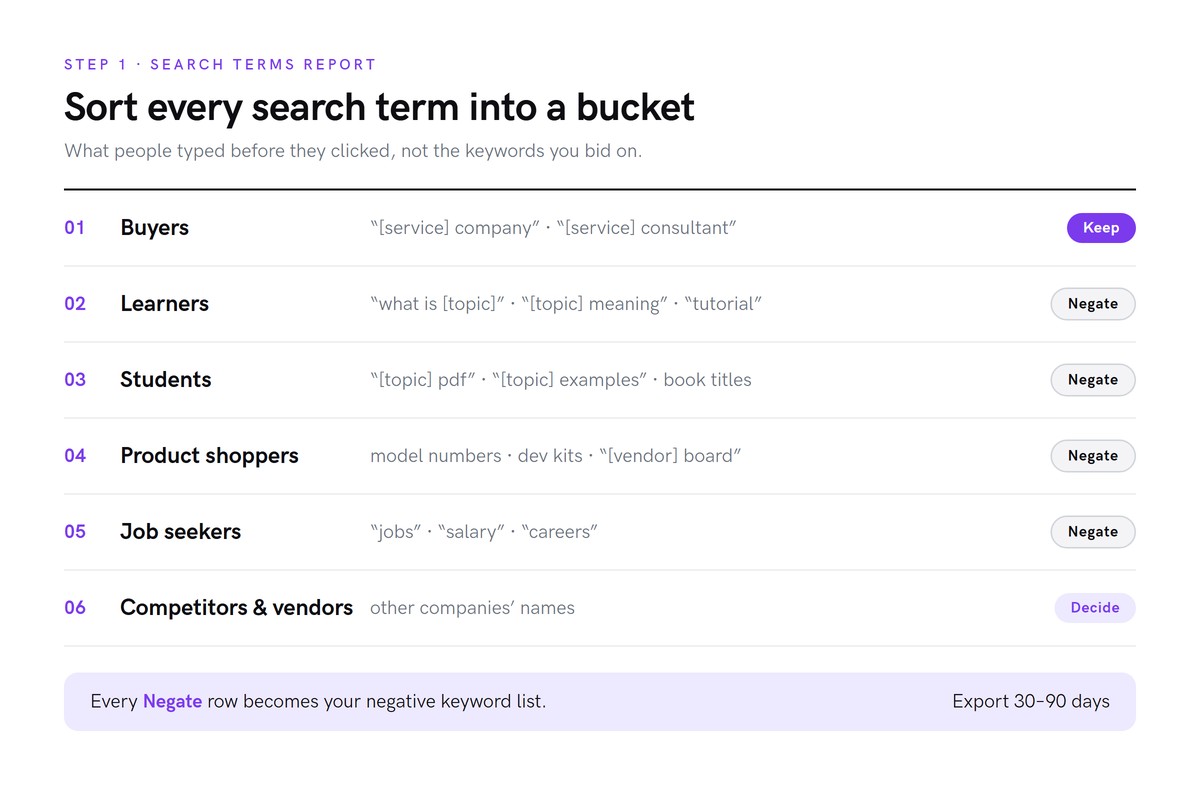
Two things to watch for. First, Google Ads doesn’t show every search term. A meaningful share of spend sits behind terms it won’t display, and the visible sample is usually representative of what’s hidden. Second, use the n-gram or “words” view if you have one. It shows which single words are costing you money across hundreds of searches, which is faster than reading them one by one.
2. Find where the money actually goes
Sort your keywords by cost. In a struggling B2B PPC account, it’s common to see two or three broad-match keywords taking nearly the whole budget.
Then sort the other way and look at the keywords with zero impressions. These are often your best-intent phrases, written in your company’s own vocabulary. Nobody searches for them because buyers don’t describe their problem the way you describe your service.
That’s the first lesson of PPC for B2B: the words on your positioning slide are rarely the words in the search box.
3. Check when and where the ads run
Open the hour-of-day and day-of-week reports. Two patterns are worth catching:
- Overnight impressions for a buyer who only searches during the working day.
- Impressions that stop by mid-afternoon on some days. That’s your daily budget running out, often on low-value morning and overnight traffic, before buyers get to their desks.
Check demographics and devices too, but in most B2B accounts they’re rarely the main problem.
Part 2: Stop paying Google Ads for the wrong people
4. Build a negative keyword list by bucket
Turn the buckets from step 1 into one shared negative keyword list and apply it at the campaign level. Google: About negative keywords
A starter list for most B2B service accounts:
- Learning terms: “what is”, meaning, tutorial, course, introduction, examples
- Free and academic: free, pdf, book, template (unless you sell templates), jobs, salary, careers
- Products and parts: the model names, kits and boards your audience shops for
- Unrelated vendors: companies whose name shows up in your search terms but who aren’t your competition
Use phrase match for multi-word negatives so you don’t accidentally block good searches. And make one judgment call carefully: don’t negate the platforms or vendors your buyers work with. “[Vendor] consultant” may be your best search term, even though “[vendor] board” is your worst.
5. Tighten match types
Broad match lets Google decide what your keyword means. With a small B2B PPC budget and a vocabulary shared with students, that’s an expensive way to learn. Google: About keyword matching options
- Move your money keywords from broad to phrase match.
- Add the “who” versions buyers search when they’re ready to hire: “[service] company”, “[service] companies”, “[service] consultants”, “[service] firm”.
- Put research-intent keywords in their own ad group with a small budget, or pause them.
6. Set an ad schedule
Run ads on weekdays during business hours in your buyers’ time zones. On a small budget this matters more than it seems: every click you buy at 2 a.m. is a business-hours click you can’t afford later.
What should a B2B PPC budget be?

Work backwards from what a customer is worth, not forwards from what feels affordable:
- Estimate your cost per click for your buyer keywords in Google Ads Keyword Planner.
- Estimate clicks per qualified lead. If you have no history, assume a few percent of clicks become a qualified lead and adjust once you have data.
- Estimate leads per sale from your sales team’s experience.
- Multiply. That’s your cost to win one customer through B2B PPC.
If one customer is worth many times that number, the budget makes sense. If it’s close, fix the account before you spend more. Every fix in this guide lowers the cost of a qualified lead without raising the budget.
Part 3: Make every Google Ads ad say one thing

7. Split ad groups by intent
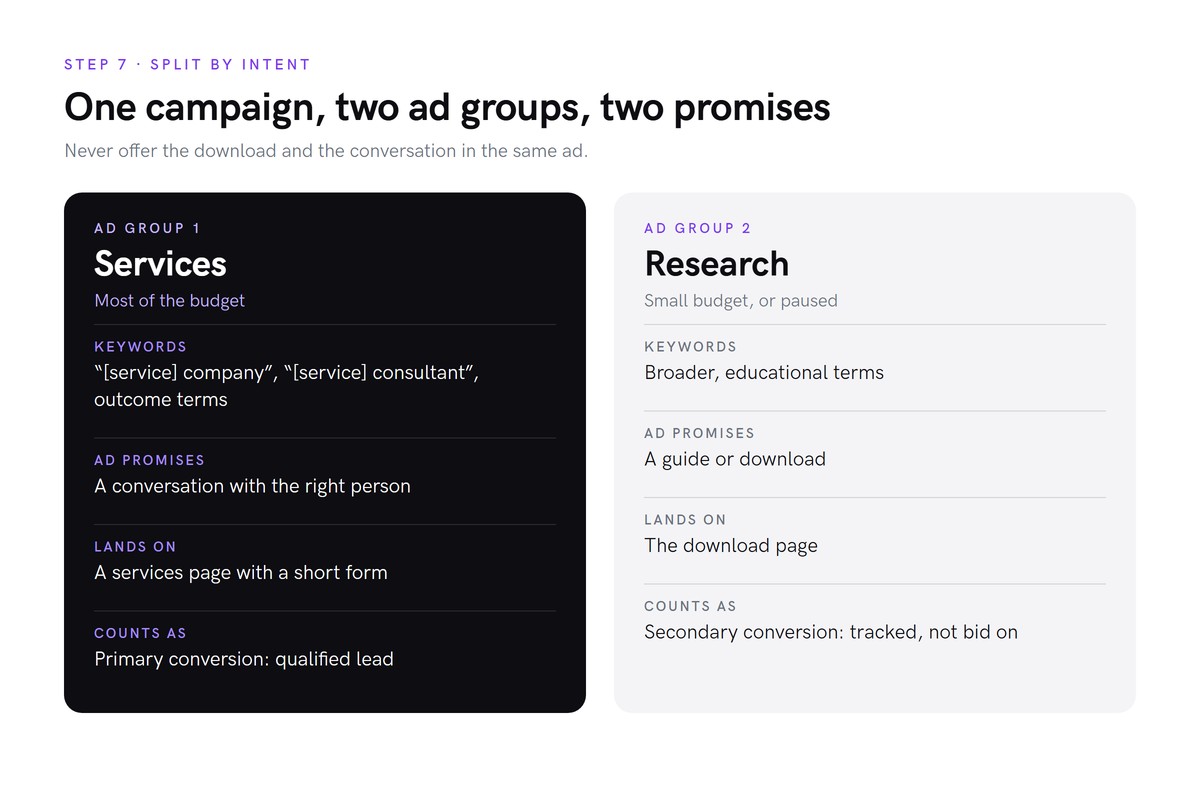
Most underperforming B2B ads try to serve two audiences at once. A typical example offers a free ebook and a free consultation in the same ad. The free ebook attracts exactly the learners you just negated, and the consultation gets lost.
Split the campaign:
| Ad group | Keywords | Ad promises | Landing page |
|---|---|---|---|
| Services (most of the budget) | “[service] company”, “[service] consultant”, outcome terms | A conversation with the right person | A services page with a form |
| Research (small, or paused) | broader, educational terms | A guide or download | The download page |
While you’re in the ads, look for stale copy. Old dates (“limited Q1 availability”), markets you no longer lead with, and offers you’ve retired all make an ad look abandoned.
8. Search your own keywords and study the competition
Use the Ad Preview and Diagnosis tool in Google Ads to see your ads, not live Google searches. Every time you search and don’t click your own ad, you add an impression without a click and nudge your click-through rate down. Google: Ad Preview and Diagnosis
Then search your main buyer keywords and build a quick table of every competitor ad you see:
| Competitor | Angle | Proof in the ad | Extensions |
|---|---|---|---|
| A | Design services | ”1,000+ projects delivered” | Image, five sitelinks |
| B | Developers on demand | ”Top 1% of talent” | Four sitelinks |
| C | Expert, fast, flexible | none | none |
You’ll usually find that everyone leads with the keyword, about half use a hard number, and the strongest ads fill every extension slot. Then look for what nobody says. In complex B2B services, the gap is often who actually does the work and getting the client all the way to the result, rather than a list of tasks.
9. Write descriptions that each do one job
Responsive search ads let you write up to four descriptions of 90 characters each, and Google shows two at a time. Each one needs to make sense on its own. Google: About responsive search ads
What the competitor table teaches:
- A number beats an adjective. “1,000+ projects delivered” beats “Fast. Flexible. Proven.” Every firm can claim the adjectives.
- List the services once. It matches more searches, and Google bolds the words that match.
- Take away the risk. A guarantee, a response time, a time zone. Most competitors won’t have one.
- Ask for one thing.
- Front-load the point. Only the first 60 or so characters reliably show on mobile.
Give your four descriptions four different jobs:
- Scope and outcome: what you do and where it gets the client. Pin this one to position 1.
- Who does the work: the senior person who leads every engagement.
- Risk reversal: your guarantee or commitment.
- Proof: one specific, checkable result.
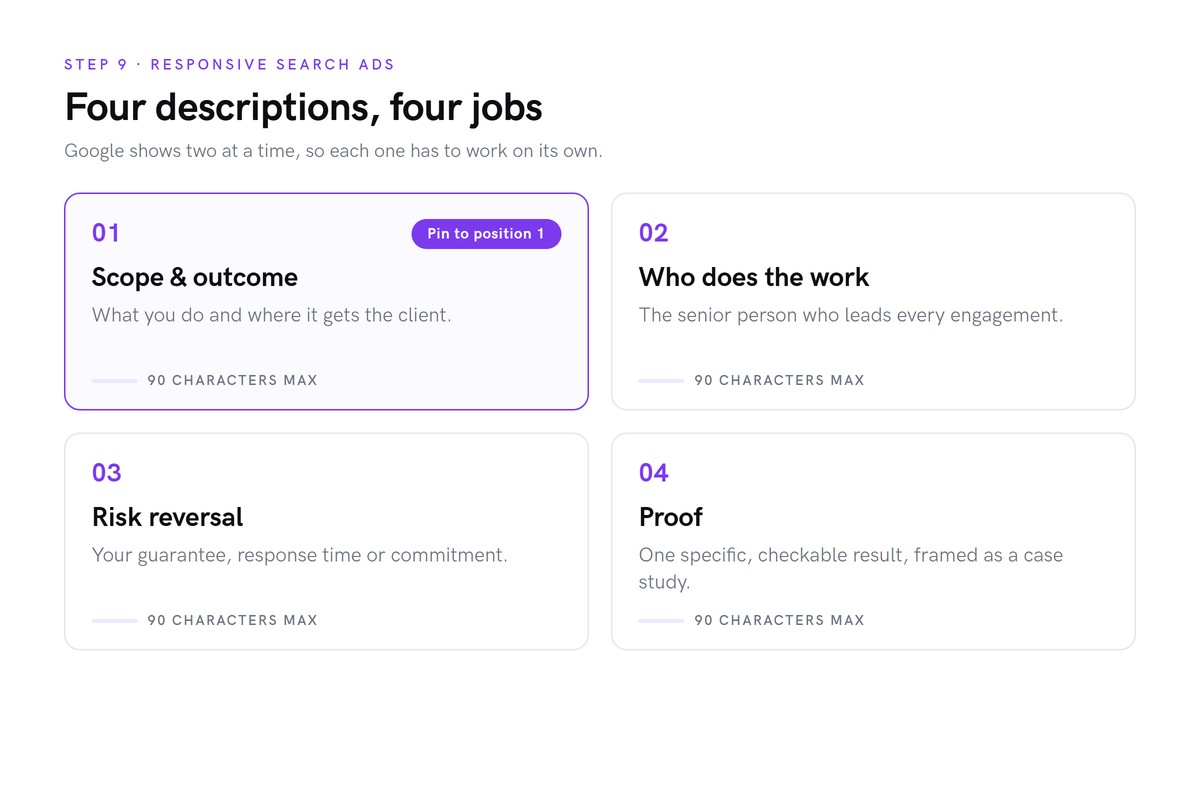
A note on proof. If you have one strong client result, resist turning it into a promise. “Cut lead time by 30%” tells every reader they’ll get 30%. “Case study: cut lead time by 30%” tells them it happened, which is what a skeptical buyer wants to know. A specific story reads as more credible, not less. Our case studies follow the same rule.
10. Fill every asset slot
Assets (Google’s name for what used to be called extensions) make your ad bigger and give buyers more reasons to click.
- Headlines: write up to 15 at 30 characters each, and pin one that matches the search, such as “[Service] Company”.
- Sitelinks: 25-character link text with two 35-character description lines. Use them for the call, how you work, who you are, a compliance or industry page, and a low-commitment download. Google: About sitelink assets
- Callouts: short proof points such as years in business, your guarantee, or certifications.
- Structured snippets: the list of services.
- Image: a real person. When every competitor shows hardware or stock photos, a face stands out and tells the buyer who they’ll work with.
- Business logo: square and landscape versions. Get the original vector file. The small logo from your website header will look soft.
Part 4: Send B2B PPC clicks somewhere that converts the right person
11. Build a dedicated services landing page
If your services ads point at a homepage or a download page, the buyer has to find their own way to a conversation. Give them a page built for the click.
A structure that works, borrowed from the strongest service pages in most categories:
- Hero: the service in plain words, one sentence on the outcome, one call to action.
- Proof strip: client logos, or if you can’t show them, three or four numbers you’d defend on a sales call.
- Why you: one problem statement and three short cards.
- Services index: a simple list of everything you do.
- Service details: a short block per service with three specific points each.
- Mid-page call to action.
- How you work: your process or framework, with one result.
- Who they’ll work with: a real person, with real credentials.
- Guarantee and compliance.
- FAQ: the questions buyers ask before they book.
- The form.
- A soft option: “Not ready to talk? Get the guide.” It catches research-stage visitors without making them the goal.
One rule for the whole page: every claim on it should be one you’d happily repeat on a sales call. Ad traffic is skeptical, and a single inflated number can cost you the conversation. If the page is where the leak is, our funnel design work starts there.
12. Use a short form, and pass the ad data through

For cold B2B PPC traffic, a short form usually beats an embedded calendar. It asks for less commitment, and it lets you qualify a lead before anyone’s time is booked.
- Keep it short: first and last name, business email, company, an optional phone number, and one open question such as “Where does your project stand?”
- Make it fast. A plain HTML form that posts straight to your CRM loads faster than a third-party embed.
- Capture the click data. Pass the Google click ID (gclid) and UTM parameters into the CRM record, so every lead shows which keyword and campaign it came from.
Part 5: Measure the right thing, and answer fast
13. Track one primary conversion: the qualified lead
This step is where most B2B Google Ads accounts go wrong, and it undoes everything above if you skip it.
- Create a “Submit lead form” conversion action and fire it only on a successful submission, never on a page view.
- Set downloads, newsletter signups and other soft actions to secondary. You’ll still see them in reports, but automated bidding stops chasing them.
- Use campaign-specific goals so your services campaign optimizes only for the lead.
Then set expectations. A well-built B2B PPC account will usually report fewer conversions than the old one. That’s the point. Ten form fills from people who can buy are worth more than fifty downloads from people who can’t.
14. Automate speed to lead

A lead that waits a day for a reply is already talking to someone else. Build the follow-up before you turn the campaign on:
- Create or update the contact in your CRM, so a returning prospect doesn’t become a duplicate.
- Tag it by source, so you can report on paid search leads separately.
- Attach a note with their message, company, campaign, keyword and click ID.
- Send an instant email from the person they’ll speak to. Plain text, no design. Confirm the request, say when they’ll hear back, and ask two or three questions they can answer by replying.
- Alert the team that a lead has arrived.
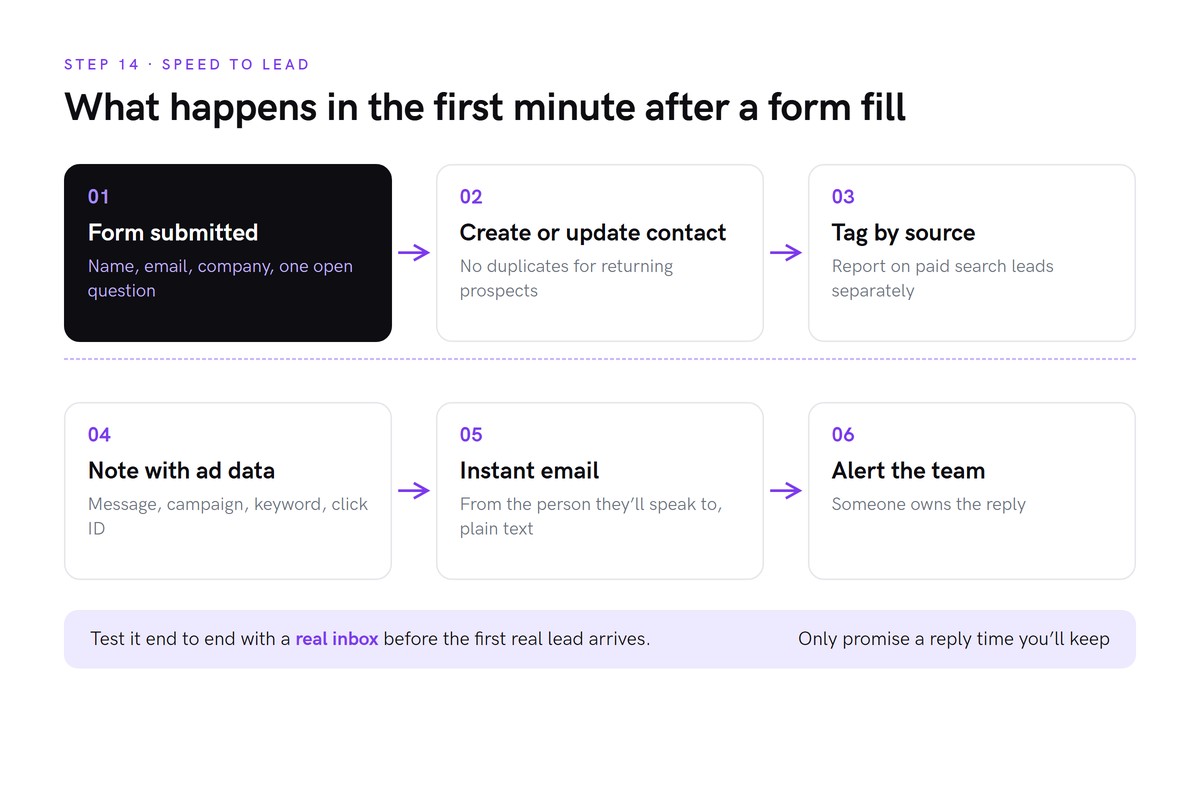
Only promise a response time your team has agreed to keep. Then test the whole thing end to end with a real inbox: submit the form, and check the contact, the tag, the note, the email and the alert. Do it before the first real lead does it for you. If your CRM can’t do this yet, that’s what CRM setup and sales automation is for.
The PPC for B2B checklist

| # | Step | Done when |
|---|---|---|
| 1 | Read the search terms report | Every term is sorted into a bucket |
| 2 | Find where the money goes | You know which keywords take the budget and which get nothing |
| 3 | Check timing | Overnight spend and early budget caps are spotted |
| 4 | Negative keyword list | A shared list is applied at campaign level |
| 5 | Match types | Money keywords are phrase match, with “[service] company” variants added |
| 6 | Ad schedule | Ads run during buyers’ working hours |
| 7 | Split by intent | Services and research have separate ad groups and pages |
| 8 | Competitor table | You know what everyone says, and what nobody says |
| 9 | Four descriptions | Scope, who, risk reversal and proof, with scope pinned |
| 10 | Assets | Sitelinks, callouts, snippets, image and logo are all live |
| 11 | Services page | The ad lands on a page built for the click |
| 12 | Short form | It posts to the CRM with gclid and UTMs |
| 13 | One primary conversion | Lead form is primary, everything else is secondary |
| 14 | Speed to lead | Contact, tag, note, email and alert are tested end to end |
B2B PPC FAQ
How does PPC work for B2B companies?
B2B PPC works the same way as any pay-per-click advertising: you bid on search terms and pay when someone clicks your ad. What changes is the goal. A B2B audience is small, buyers share vocabulary with students and job seekers, and one form fill starts a long sales cycle. B2B PPC works when the account is built to exclude the wrong searchers, send the right ones to a page built for them, and count only qualified leads as conversions.
How much should a B2B company spend on Google Ads?
Start from what one customer is worth. Estimate your cost per click from Google Ads Keyword Planner, multiply by the clicks you need for one qualified lead, then by the leads you need for one sale. If one sale is worth far more than that number, the budget makes sense. Many B2B accounts start with enough budget to reach the buyers’ working hours every weekday, then scale once they can see which keywords produce sales conversations.
Is LinkedIn or Google Ads better for B2B?
They do different jobs. Google Ads captures people who are already searching for what you sell, so it suits B2B companies with existing demand. LinkedIn Ads reaches people by job title, company and industry before they search, so it suits building awareness with a defined list of accounts. Most B2B companies with a clear service and some search demand should get Google search working first, then add LinkedIn to reach buyers who aren’t searching yet.
How long does B2B PPC take to work?
Ads start showing within a day, but a B2B account usually needs four to eight weeks of clean data before you can judge it. Fixes like negative keywords and ad schedules show their effect within days. Lead quality takes longer to read, because you need enough leads to reach sales conversations. Judge the account on qualified leads and conversations, not clicks.
What is a good conversion rate for B2B PPC?
There isn’t a reliable universal number, because it depends on what you count as a conversion. An account that counts ebook downloads will always report a higher conversion rate than one that counts sales-ready form fills. Compare your own account against itself over time, and track the rate from click to qualified lead rather than from click to any conversion.
Where to start
If you only have an hour, do steps 1, 4 and 13. Reading the search terms shows you where the money goes, a negative keyword list stops the worst of it today, and fixing the primary conversion stops Google Ads from learning to find more of the wrong people.
PPC for B2B works best as part of a wider demand generation system, where paid search captures the buyers your content and outreach have already warmed up. Want a second set of eyes on your account? Send us your search terms report and we’ll tell you what we’d cut first.
Ready to build the system?
Your expertise is the product.
Your go-to-market is the multiplier.
If this resonated, let's talk about what B2B marketing built around your buyers could look like for your company.
Get in touch →