The Ultimate Guide to Building an SEO Strategy for Consulting Firms (2027)
Imagine a manufacturer calls your consulting firm after a referral. The operations director already knows your name. She wants to know whether you’ve helped a company like hers, how you’d approach the work, and what she can tell her CFO before asking for budget.
Now imagine the same director a month earlier. She’s just found out that a major customer wants proof of stronger security controls. She searches for a checklist, sends it to her IT lead, and starts asking what they can handle internally. By the time she looks for a consulting firm, she has already formed an opinion about what the work should involve.
Your website can be useful at both moments. A B2B SEO strategy helps you decide which buyer questions to answer, which pages to use, and how to see whether those pages are getting found. We’ll work through a real example from Influential B2B and give you a keyword map you can copy for your own firm.
What is B2B SEO?
B2B SEO, short for business-to-business search engine optimization, is the work of helping people find your website in unpaid search results when they’re researching a problem or evaluating a provider for their business. For a consulting firm, that could mean publishing a guide that helps a buyer scope a problem, a case study that shows how you solved it, or a service page that explains what an engagement looks like.
Search engines need to discover your pages, understand what they cover, and decide whether to show them for a particular search. A clear page title helps describe the subject. Links help readers and search engines find related pages. The page itself has to answer the question that brought someone there. Those are the basics you’ll put to work in this guide. Google’s SEO Starter Guide
How search changed and what still matters
Early SEO advice often focused on putting keywords in the right places and acquiring links. Both ideas have a practical core. The words on a page help describe its subject, and links help people discover it. Repeating a phrase or collecting links indiscriminately tells you little about whether a page answers a buyer’s question.
| What changed | What it means for your firm |
|---|---|
| Panda and Penguin. Google introduced Panda in 2011 to improve the quality and originality of results and Penguin in 2012 to combat link spam. | Publish something that draws on your own experience. Look for links from sources your buyers already use, such as a trade association or a partner’s implementation guide. |
| Hummingbird and later language systems. Google made a major change to its ranking systems in 2013 and later introduced systems such as BERT to better understand language in context. | Give close variants like “demand generation consultant” and “demand generation consulting” one page when the buyer wants the same thing. |
| Mobile-first indexing. Google shifted to using the mobile version of pages for indexing and ranking. | Open your pages on a phone. Make sure the examples, tables, and next steps are available and usable there. |
| Helpful content and AI answers. Google incorporated its helpful content system into core ranking in 2024. AI Overviews and AI Mode added ways for people to get an answer and explore sources from Search. | Give readers a clear answer, then add evidence they can inspect or use. A table showing how you made a decision can be more useful than another paragraph defining the topic. |
That history explains how we use the competitor numbers later in this guide. Word count gives us a sense of scope. Keyword density helps us spot repetition. The writing decisions come from the reader’s task and what the competing pages leave unanswered. Google’s ranking systems guide · Mobile-first indexing guidance · Google’s AI search guidance
How B2B SEO differs from consumer SEO
The basic search mechanics are the same. What changes for a consulting firm is the decision the reader is trying to make. An operations director may want to understand the scope. An IT lead may want to see how you handle the technical work. The person approving the budget may ask for evidence that you’ve done it before. Those people may visit different pages and share what they find before anyone books a call.
That affects how you judge a topic. A question that only comes up in your niche can still deserve a page if it helps the right buyer make a decision. Ask whether a prospect has asked you the question before, whether you can answer it from experience, and whether the answer gives them a useful next step. Later, search data can help you decide which of those opportunities to tackle first.
Match the search to what the buyer needs
The words someone types are their query. What they’re trying to accomplish is their search intent. You can usually make a reasonable first guess from the wording. Looking at the results gives you a way to check it.
| A buyer might search for | What they need | Page that could help |
|---|---|---|
| How to prepare for a customer security review | Understand the work ahead | A guide or checklist |
| Internal vs. outsourced security assessment | Compare two ways to do the work | A comparison that explains when each option fits |
| Security assessment case study for a manufacturer | Check whether a provider has handled similar constraints | A case study that shows the starting conditions, decisions, and outcome |
| Security assessment consulting for manufacturers | Find and evaluate a provider | A service page with scope, relevant proof, and a next step |
Each example belongs to the same buying decision. A guide can link to a service when the reader might need help. A service page can link to a case study when the reader needs evidence. Give each page one main job and use links to help readers move between jobs at their own pace.
You can start with a single service and a blank spreadsheet. The rest of this guide shows how to turn those buyer questions into a page plan, then check it against what Google already shows.
How to build your SEO strategy
1. Build your B2B SEO strategy around the work clients hire you to do
Pick one service you can explain and deliver today. Write down who buys it, what happens before they look for help, what they want someone to do, and what you can show as proof. Pull examples from discovery calls, proposals, and client emails. The phrases buyers use to describe a stalled project often give you better starting points than a list of service categories.
Imagine you run a cybersecurity consultancy. A buyer might first ask how to prepare for a customer security review. Later, they might search for a consultant who can help them run the review. Both searches are relevant to the same firm. The first calls for a guide or checklist. The second calls for a service page with scope, fit, evidence, and a way to get in touch.
For Influential, we used past keyword research, the language in buyer conversations, and a study of what businesses pay outside marketing providers to do. The study helped us decide which offers were worth testing. Search Console helped us see where our site already appeared. That distinction mattered for CRM setup and sales follow-up. It fit work we could deliver, so we gave it a service page. We had no visible query evidence for it in the Search Console export we reviewed.
Start your sheet with three or four candidate topics. For each, write one question a buyer might ask while learning and one phrase they might use when looking for a provider. Search both and look at what kinds of pages appear. If the results include both guides and services, look at what each result promises and decide which promise your page can make.
Once you have a short list, use Google Keyword Planner to get a rough sense of how often people search for each phrase. Enter the terms, select the market you serve, and record the Avg. monthly searches figure or range along with the location, date range, and search network. Google’s estimate includes close variants, so keep related terms together and avoid adding their estimates as if each counted a different set of searches. A low estimate can still be worth investigating if prospects ask about the work and your firm can help. Google’s guide to Keyword Planner metrics
For demand generation consulting, Keyword Planner showed 90 average monthly searches with the report set to the United States, all languages, and the Google search network for November 2025 through October 2026. The chart spiked in September and fell back in October, so use the average as a planning estimate. The Low competition label refers to advertisers. Assess organic competition by looking at the pages that already rank and what they offer readers.
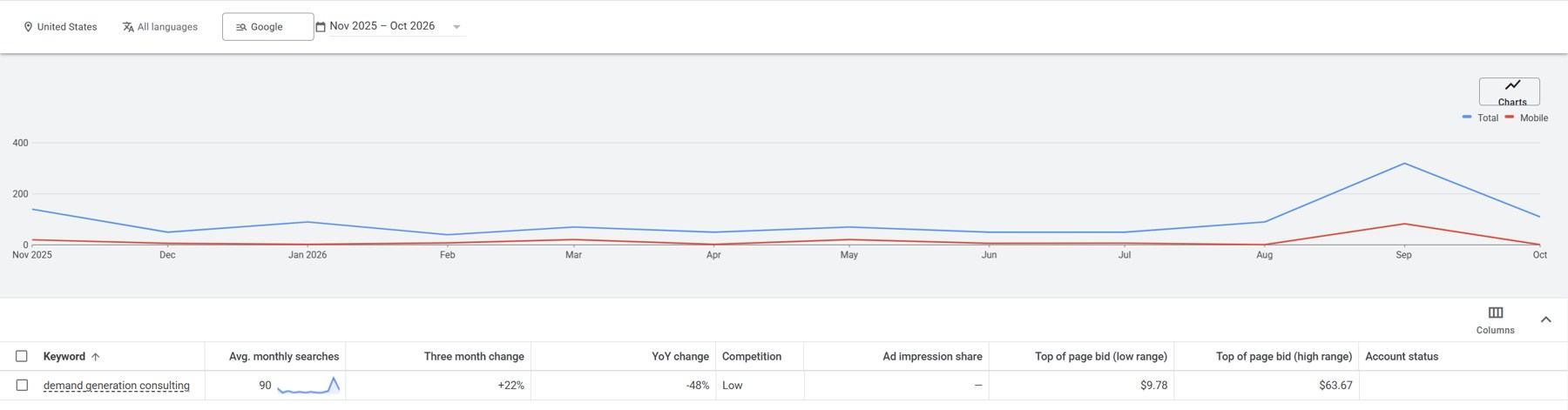
Google Keyword Planner, United States, Google Search, November 2025 through October 2026.
We took the same phrase into AnswerThePublic to look for questions we could answer. Its U.S. English report, updated November 12, 2026, displayed an estimated 110 searches per month for the seed term. We kept both estimates with their sources and used the report to look for question ideas. The free view surfaced few organic keyword suggestions, and the clearest ideas for our page came from the section labeled AI Prompts.
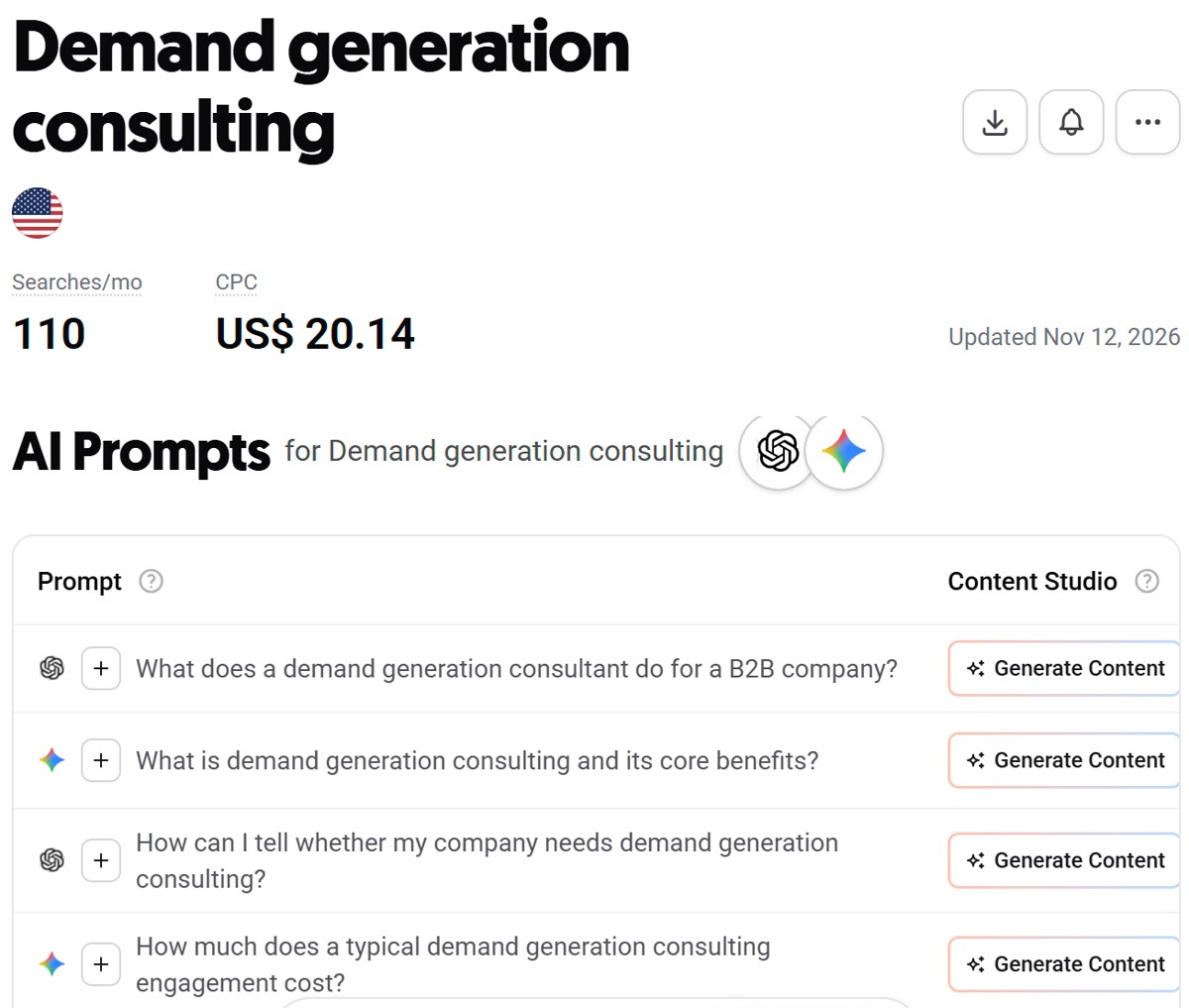
Two excerpts from the same AnswerThePublic report show the keyword summary and AI Prompts section.
Two of those prompts were about what a demand generation consultant does and how a company can tell if it needs one. A third asked about the cost of an engagement. These are ideas to check against sales conversations. If buyers keep asking them, you could use them to explain scope, fit, and pricing factors on the service page. A fourth prompt asked what demand generation consulting is and what benefits it offers. That could be a short definition on the service page or part of an existing guide if readers need a fuller explanation. AnswerThePublic’s guide to question research
The next step is to see which of your pages Google already shows. Keep the tools’ monthly search estimates in your keyword research notes and record Search Console impressions separately. Those impressions count how often Google showed a result for your site during the selected period.
Benchmark the pages already showing up
Before you outline a new page, search your target phrase and open three to five results that serve the same reader need. If you’re writing a guide, compare it with other guides. Record the query and date so you can repeat the check. For each page, work from the article body and record the word count, exact keyword mentions, images, and main headings. Note whether it uses tables, FAQs, screenshots, or examples, and what question you still had after reading it.
We did this for “B2B SEO strategy” before outlining this guide. Here’s what four results looked like in our sample.
| Guide | Body words | Exact mentions | Keyword density | Body image elements |
|---|---|---|---|---|
| Search Engine Land | 2,984 | 2 | 0.07% | 47 |
| HubSpot | 5,435 | 8 | 0.15% | 16 |
| Semrush | 2,210 | 7 | 0.32% | 24 |
| Ahrefs | 2,198 | 5 | 0.23% | 18 |
We calculated density as exact mentions of the phrase divided by body word count. Image counts can include promotional graphics or duplicate elements, so we also looked at what the visuals helped readers understand. The sample ranged from about 2,200 to 5,400 words, and exact phrase usage varied even among guides answering the same search. Use the counts to get a sense of scope and check your draft for repetition. Search Engine Land · HubSpot · Semrush · Ahrefs
The opening sections told us more about what this guide needed. All four explain what B2B SEO is before asking readers to do keyword research. That led us to explain how a consulting buyer searches and what each type of page helps them do before opening Search Console. For the worked example, we chose to show the decision from start to finish, including the actual search data and the links we added.
2. Find which pages Google already shows
Start with the pages related to the service you picked. Open your website navigation or your CMS page list and copy the web addresses into a spreadsheet. Include the service page, related articles, case studies, and useful resources. An XML sitemap is a machine-readable list of URLs your site wants search engines to discover. It’s a faster way to start the inventory if you’re doing this across the whole site. Keep the URL and title in separate columns so you can track a title change without losing the page’s history.
Next, open Performance → Search results in Google Search Console. It’s Google’s tool for seeing how your site appears in unpaid search. An impression means a result for your site was shown. A click means someone clicked through from a Google result. Click-through rate (CTR) is clicks divided by impressions, and average position summarizes where your result appeared. Choose a date range long enough to surface the searches your site appears for. Record the range and any country, device, or search-type filters so you can use the same settings when you come back to measure.
- In Queries, find a relevant phrase and record its clicks, impressions, CTR, and average position.
- Click the query to filter the report, then open Pages. Record the URLs Google showed for that query and their figures within the filter.
- Click an individual URL and return to Queries with the page filter applied when you want to understand what else the page appears for. Clear the original query filter first.
- Repeat for close variants and for one or two phrases that suggest a buyer wants to hire someone.
Here’s what that looked like on our site. “Demand generation consulting” and “demand generation consultant” had 777 impressions and zero clicks combined in one query report. In a separate Pages view filtered for “demand generation consulting,” our strategies article had 379 impressions and our comparison of demand engineering and demand generation had 132. Both had zero clicks in that filtered view. That gave us a lead to investigate. Google was showing educational articles for a phrase someone might use when looking to hire. We opened both pages to see what each helped a reader do. Google’s Search Console walkthrough
Impressions tell you that a result appeared for a search. They’re a starting point for investigating an opportunity. Look at position before interpreting zero clicks, and read the pages before you decide the title needs work. A result seen mostly below the first page and a result consistently near the top call for different investigations. Google’s definitions for clicks, impressions, and position
| Page shown for “demand generation consulting” | Impressions | Clicks |
|---|---|---|
| B2B Demand Generation Strategies | 379 | 0 |
| Demand Engineering vs. Demand Generation | 132 | 0 |
Figures transcribed from the query-filtered Search Console Pages view.
3. Give every page a job in your keyword map
The keyword map turns your B2B SEO strategy into a plan for individual pages. Give each page a primary query, a few close variants if useful, and an intent. Write down what the page should help a visitor do. If two pages have nearly identical jobs, read them side by side before briefing a third.
Here’s how three pages in our demand generation cluster fit together.
| Page | Primary query | Page job | Action |
|---|---|---|---|
| Demand Generation Consulting | B2B demand generation consulting | Help a buyer evaluate and inquire about the service | Build the service page |
| B2B Demand Generation Strategies | B2B demand generation strategies | Help a reader choose strategies to try | Keep the guide and link to the service |
| Demand Engineering vs. Demand Generation | Demand engineering vs. demand generation | Help a reader understand the difference between two approaches | Keep the comparison and link to the service |
Notice what happens when you read those page jobs without the keyword column. Each page still has a reason to exist. A buyer can compare the approaches, learn how to run campaigns, or see what an engagement involves. The same topic can support all three jobs. If two pages are both trying to sell the same engagement to the same buyer, that’s where I’d look for a page to strengthen or consolidate.
Download the keyword map CSV or copy the template below into Google Sheets. Use the first row for a real URL and work through it before mapping the whole site.
| URL | Primary query | Intent | Page job | Current title | Current description | Proposed title | Proposed description | Link to | Decision |
|---|---|---|---|---|---|---|---|---|---|
/your-page/ | One primary query | Learn, compare, or hire | What should the reader be able to do? | Existing title | Existing description | Draft title | Draft description | Relevant destination | Keep, build, refresh, or link |
Add columns for the date range, clicks, impressions, CTR, and average position. If your proposed title is in column G, use =IF(G2="","",LEN(G2)) to count its characters. Use the same formula with H2 for the description.
4. Decide whether to build, refresh, keep, or link
Build when an important buyer task has no good destination. Our demand generation articles explained the work. We needed a page that could explain the engagement, show how we approach it, and give an interested buyer a next step. The Demand Generation Consulting page became that destination.
Refresh when you have the right page type and its copy undersells or obscures what it does. We already had a cybersecurity service page. We updated its title and opening around cybersecurity marketing consulting and added a direct link from the related article. The cybersecurity marketing article could keep teaching the topic while the cybersecurity consulting service page explained what buyers could hire us for.
Keep when a page already answers a useful question and has evidence of doing its job. Our Demand Engineering definition earned seven of the site’s 16 clicks in the pre-release baseline. We kept its URL and informational focus when we repositioned the homepage around B2B marketing.
Link when readers could reasonably want the next page at that point in the article. In our demand generation strategies guide, a reader thinking about outside help can follow a descriptive link to the consulting service. Put the link where that decision comes up. A reader should be able to tell where it leads from the words they click. Google’s guidance on crawlable links and anchor text
Publish evidence a buyer can use
Return to the operations director in the opening. She may need to explain to the CFO what the assessment covers, what the internal team will need to contribute, and how the findings will be used. A case study she can share should show the starting conditions, the decisions your team made, and what happened next. If you have permission to anonymize the project, keep the details that explain why the work was difficult and remove identifying information.
On our site, the evidence for this guide is the query-to-page example and the three rows of the keyword map. A reader can inspect the pages and repeat the process. For your firm, a decision table, an annotated deliverable, or a checklist you use in discovery can serve the same purpose. If a trade association or implementation partner already publishes on the topic, share the specific resource and explain what their readers can do with it.
5. Rewrite the search result and verify the release
Read your title and description as a pair. The title should name the page’s subject early. The description should give the right reader a reason to choose the page. If it promises a checklist, the checklist should be easy to find. If it promises consulting, the scope and next step should be clear.
Here’s how that worked for our demand generation pages. The service page title became “B2B Demand Generation Consulting.” The strategies article kept its educational focus. Its title, “6 B2B Demand Generation Strategies for Consulting Firms,” tells readers they’ll get ideas they can apply. Read those titles side by side and you can choose which one to open before reading either description.
Then go back to the questions you collected in step one. Our AnswerThePublic report suggested that a buyer might ask what a demand generation consultant actually does. That gives you something specific to check in the service page opening. Can someone tell what you’ll look at first and what help they can hire you for? For our page, that means assessing the pipeline, choosing channels, and launching campaigns. Questions about fit and cost belong farther down if you can answer them with specifics from real engagements.
Our review used roughly 30–60 characters as a working range for titles and a 155-character ceiling for proposed descriptions. Put the most useful words early, where they can survive a shorter display. Google can choose different title links and snippets, so make the visible page heading and opening reinforce the same promise. Screaming Frog’s page title guide · Yoast’s meta description guide · Google’s snippet documentation
Before release, follow the path a reader would take. Open the strategies article, find the link to the consulting service, and click it. Does the destination explain the engagement the link led you to expect? Repeat the check from the comparison article. Then open the published service page and check the title, description, and preferred URL against your keyword map.
We did that in two passes. The first gave the demand generation service page and its supporting articles their own roles and links. Later, when we rolled out reviewed metadata to another 36 pages, we checked the generated site against the keyword map and verified that the six priority pages kept their earlier titles and descriptions. For a smaller site, the same check can be one row per changed URL and a visit to each live page. Service-page release · Metadata release
Check the live page before you measure it
- Can Google find it? Follow a link from a relevant page that is already live. If you maintain an XML sitemap, check that the new URL appears there.
- Can Google index it? Inspect the URL in Search Console. Check whether Google can fetch the page and whether an indexing directive is blocking it. A successful live test tells you about accessibility at the time of the test. Indexing status comes from the indexed report.
- Is Google using the intended address? If the same content is available at several URLs, check the preferred address, called the canonical URL. Once Google has processed the page, URL Inspection can show which canonical Google selected.
- Can a reader take the next step? Open the page on your phone. Read the example, follow its links, and check that any template, contact form, or other next step works.
Google’s URL Inspection documentation · Google’s guidance on canonical URLs
6. Measure which searches land on which pages
The first question for our demand generation page is specific. Does Google start showing the new service URL for “demand generation consulting”? Before the change, we saw two articles in the filtered Pages view. That’s the view we’ll return to after the new page has had time to be crawled.
Record the date you published, then compare equal-length windows in Search Console with the same filters. Start with the consulting query and open Pages. Write down which URLs appeared, their impressions and clicks, and their average position. Then repeat for an educational query such as “B2B demand generation strategies.” That second check tells you whether the article is still reaching the readers it was written for.
| What you see in Search Console | What to check next |
|---|---|
| The new service page has no impressions for the consulting query | Use URL Inspection to check whether Google has indexed the page. If it has, check the links from the Services hub and both articles, then see what types of pages currently appear for the query. |
| The service page starts appearing, with impressions and few or no clicks | Check average position and inspect the live results before editing again. If the page rarely appears near the top, leave the title in place while you collect more data. If it appears near the top consistently, look at what the displayed title and snippet tell a buyer about the service. |
| Both articles and the service page appear for the consulting query | Check the educational queries separately. If an article is earning visibility for its own topic, keep serving those readers and make the route to the service easy to find. Investigate further if two URLs keep trading visibility for the same intent. |
| Clicks rise while impressions and position stay roughly steady | Record the change and keep tracking it. The result is consistent with a stronger click-through rate. Page content, internal links, and metadata changed during this project, so the comparison can’t isolate one cause. |
Our six priority pages are still in that measurement window. We can show the starting point and what shipped. The follow-up data will tell us which searches the new pages reach and whether more people choose to click.
Follow the visit into the sales process
Search Console shows which searches brought clicks to the guide or service page in aggregate. Analytics can show whether visitors who land on the guide go on to visit the service page or submit an inquiry, if those actions are tracked. The CRM can tell you whether an inquiry became a qualified opportunity. Keep those views side by side. If someone reads the guide, returns through a referral email, and books a call weeks later, you may only see part of the path. A discovery-call question about what they read before getting in touch can fill in some of that context. Google’s guide to using Search Console and Analytics together
What to watch in 2027
Google’s 2026 updates added clearer inline source links to AI search and expanded conversational follow-ups. A consulting buyer could start by asking what a demand generation consultant does, then follow up with “What could they fix if most of our leads come from referrals?” A service page that describes the scope, and a case study that shows the starting conditions, give the buyer material to evaluate at both points. Google says the same SEO fundamentals apply to AI Overviews and AI Mode. Google’s 2026 search announcements · October 2026 updates · Google’s AI search guidance
Here’s what we’ll watch in 2027. Do answers surface specialist firms for follow-up questions? Which sources get linked when buyers ask about costs, constraints, or results? Do prospects mention seeing those sources before contacting a firm? Pick a few questions you hear in sales calls. Check them periodically, record the date and sources shown, and compare your observations with Search Console, referral traffic, and sales conversations. Google includes traffic from its AI search features in the overall Web performance report, so a change there alone can’t tell you which feature drove it.
Your first 90 days putting a B2B SEO strategy into practice
| When | What to do | What you should have at the end |
|---|---|---|
| Days 1–30 | Pick one service you’ve sold. Collect questions from buyer conversations, benchmark the search results, and check the URLs that already appear. | A keyword map with one service page, its supporting pages, and a baseline for the searches you care about. |
| Days 31–60 | Build or refresh the service page. Update one supporting guide, add a relevant proof asset, and connect them with links. | A buyer can go from the first question to an example of your work and then see how to hire you. |
| Days 61–90 | Return to the same Search Console filters. See which pages are appearing, inspect the results, and review any inquiries with the sales team. | A decision about what to improve next. New pages with limited data may need more time before you judge their performance. |
Pick a service you’ve sold and write down one question a buyer asked before hiring you. Find the page you would send them today. If it answers the question, look at where you’d send the buyer when they’re ready for the next step. If you keep having to explain the same thing in a follow-up email, use that explanation to decide what the site needs. Put the page, the question, and the next step on one row of your keyword map. That’s your first change. If you’d like help making those decisions across your site, see how we approach B2B content and SEO.
Frequently asked questions
These questions draw on the AI Prompts section of AnswerThePublic’s November 12, 2026 U.S. English report for “B2B SEO.” The prompts helped us identify what to explain. The report also surfaced agency searches, which serve a different reader need.
How is B2B SEO different from B2C SEO?
The search fundamentals are the same. A consulting purchase often involves several people who need different evidence. A technical lead may need to understand your approach, while a budget owner may want a comparable case study. Give each page a clear job and link to the proof or service details a buyer may need next.
Which tools do I need to start with B2B SEO?
Start with Google Search Console and a spreadsheet. Search Console shows where your own site appears, and the spreadsheet records what each page should do. Add Keyword Planner for search-volume estimates and AnswerThePublic for question ideas when you need to explore a new topic.
How do I improve keyword research for a consulting firm?
Start with a question prospects ask before buying a service you already sell. Search that question and inspect the types of pages that appear. Then filter the query in Search Console and open the Pages tab. Use the two views to decide whether to create a page, improve an existing one, or add a link.
How should a consulting firm structure its site for SEO?
Give each distinct service a clear page. Link to it from guides that explain the problem and case studies that show your work. Make important pages reachable from a relevant hub and use descriptive link text so readers know where they’ll land.
Ready to build the system?
Your expertise is the product.
Your go-to-market is the multiplier.
If this resonated, let's talk about what a demand engineering system looks like for your firm.
Get in touch →